
100JSProjects
LearnProjectsExplore all projects
100JS_WORKSPACE/Build · Learn · Repeat
100JSProjects

Practical HTML, CSS, and JavaScript projects designed to help you turn concepts into real skills—one build at a time.

01Explore

./All projects./Learning guides./About./Contact./Privacy

02Resources

./GitHub repository./Support the project

© 2026 100 JS Projects. Built for developers.

TermsCookiesContact
JS//Projects/Social Media Selector Menu

Social Media Selector MenuHTML, CSS & JavaScript Project

HTML5CSS3JavaScript
View Source CodeLive Demo
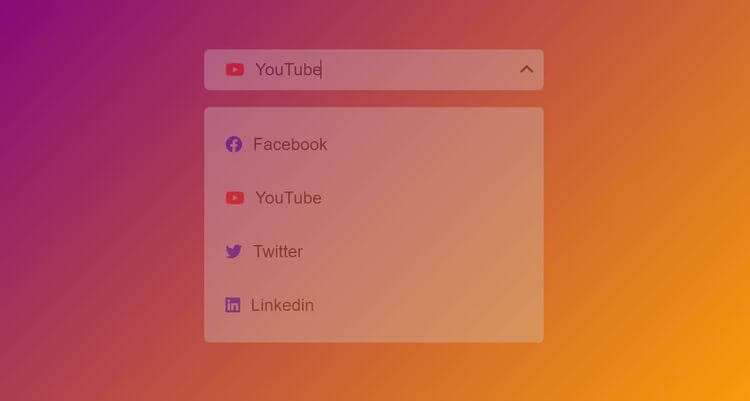
Social Media Selector Menu project previewTry Live Demo
What you'll build

Social Media Selector Menu

We'll create a social media selector menu that displays social media text and icons. As we click on the menu, we'll see a list of social media, and each will have a hovering effect. When we click on an icon, such as Facebook or YouTube, the social media text will change accordingly. The icons will also rotate as we open or close the menu. Finally, clicking on any icon will make the menu disappear. We'll learn how to toggle classes and change the appearance of the website using these methods. This project is ideal for those who want to enhance their CSS and JavaScript skills while creating an attractive social media menu.

HTML
— Structure
CSS
— Design
JavaScript
— Logic
Complete project files

Build It from the Source Code

Create these three files, copy the code into each one, then open index.html with Live Server.

Project structure
social-media-selector-menu/
├── index.html
├── style.css
└── index.js
1
2
3
4
5
6
7
8
9
10
11
12
13
14
15
16
17
18
19
20
21
22
23
24
25
26
27
28
29
30
31
32
33
34
35
36
37
38
39
40
41
42
43
<!DOCTYPE html>
<html lang="en">
  <head>
    <meta charset="UTF-8" />
    <meta http-equiv="X-UA-Compatible" content="IE=edge" />
    <meta name="viewport" content="width=device-width, initial-scale=1.0" />
    <title>Social Media Selector Menu</title>
    <link
      rel="stylesheet"
      href="https://cdnjs.cloudflare.com/ajax/libs/font-awesome/6.0.0-beta2/css/all.min.css"
      integrity="sha512-YWzhKL2whUzgiheMoBFwW8CKV4qpHQAEuvilg9FAn5VJUDwKZZxkJNuGM4XkWuk94WCrrwslk8yWNGmY1EduTA=="
      crossorigin="anonymous"
      referrerpolicy="no-referrer"
    />
    <link rel="stylesheet" href="style.css" />
  </head>
  <body>
    <div class="menu">
      <p>Social Media</p>
      <i class="fas fa-angle-down"></i>
    </div>
    <ul class="social-lists hide">
      <li>
        <i class="fab fa-facebook" style="color: blue"></i>
        <p>Facebook</p>
      </li>
      <li>
        <i class="fab fa-youtube" style="color: red"></i>
        <p>YouTube</p>
      </li>
      <li>
        <i class="fab fa-twitter" style="color: blue"></i>
        <p>Twitter</p>
      </li>
      <li>
        <i class="fab fa-linkedin" style="color: blue"></i>
        <p>Linkedin</p>
      </li>
    </ul>
    <script src="index.js"></script>
  </body>
</html>

JS// Related Projects

Keep Building with Similar Projects

Continue your learning journey with these handpicked projects that share similar concepts and technologies

Recipe Book App project preview
HTMLCSSJavaScript

Recipe Book App

In this project, we're developing a recipe book application that features a variety of recipes obtained through a free recipe API. We need an API key to access this API. Each time the page is refreshed, a new set of recipes with distinct ingredients will be displayed. Additionally, a link is provided to access the recipe website.

View project
Pomodoro Timer project preview
HTMLCSSJavaScript

Pomodoro Timer

The objective of this project is to design a Pomodoro timer that features a countdown clock and three functional buttons, namely start, stop, and reset. Upon clicking the start button, the timer will commence counting down from 25 minutes. Should one desire to halt the countdown, the stop button can be pressed. The countdown can be resumed by hitting the start button, and by clicking on the reset button, the timer will reset to 25 mins again. An alert will notify the user when the timer reaches zero. This Pomodoro timer is an ideal tool for individuals seeking to focus on a task for a set amount of time, followed by a break. By implementing this technique, productivity and time management skills can be improved. To create this timer, one must initially grasp the principles of CSS for styling purposes. Next, event listeners will be added to the buttons using JavaScript. Finally, a timer will be established using the SetInterval function in JavaScript.

View project
Simple Stopwatch project preview
HTMLCSSJavaScript

Simple Stopwatch

Welcome to the Stopwatch Project! We will create a timer displayed at the top, along with three buttons - start, stop, and reset. Clicking the START button will begin the timer. The STOP button will pause the timer using a JavaScript method called SetInterval, which can be cleared using clearInterval. The RESET button will reset the timer to zero. If you click STOP and then START again, the timer will continue from the previously elapsed time. We'll start by installing CSS for the buttons' design and hover effects, then use JavaScript to get the browser time, manipulate the content, replace it with the calculated time, and provide the start, stop, and reset functionality.

View project
{ }View All Projects